Visual Studio Code
Connect Fullstory to Visual Studio Code so you can query your product data from Chat using the Fullstory agent plugin and MCP server.
Prerequisites
- StoryAI features enabled for your Fullstory org (see the note below — this is a hard requirement; without it your client will connect but show zero tools).
- Visual Studio Code with GitHub Copilot and current Chat / agent extension support (the commands below require a build that includes Chat: Install Plugin from Source and MCP: List Servers)
Fullstory MCP requires StoryAI features to be enabled for your org. If your org has opted out of StoryAI, your MCP client will appear to connect successfully (OAuth completes, the server shows as "connected") but no tools will be available.
An account Admin can verify or change this at Settings > StoryAI Features in Fullstory. If you don't see that page, you don't have the role needed to change it. Ask an Admin in your org.
See FAQ & Troubleshooting if your client is connected but no tools appear.
Setup
1. Install the plugin from source
Open the Command Palette (Ctrl+Shift+P on Windows and Linux, Cmd+Shift+P on macOS), run Chat: Install Plugin from Source, and choose that command when it appears.
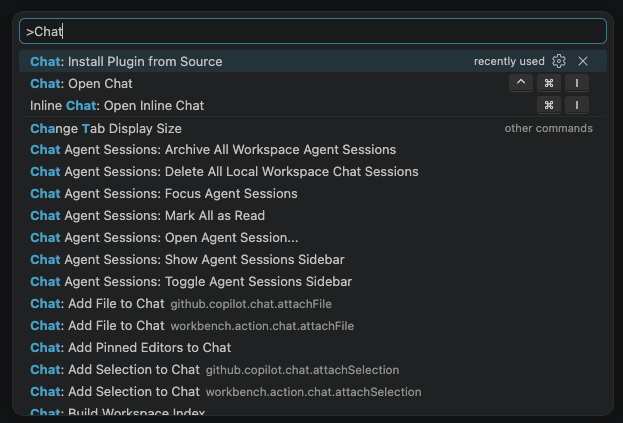
2. Enter the Fullstory skills repository URL
When prompted, enter:
https://github.com/fullstorydev/fullstory-skills
3. Open MCP server list
Open the Command Palette again and run MCP: List Servers.

4. Select the Fullstory agent plugin entry
In the list, choose fullstory (Agent Plugin).

5. Start the MCP server
Select Start Server. VS Code may prompt you to Allow authentication or related permissions—approve those prompts so the OAuth flow can proceed.

6. Complete sign-in
When prompted, choose Sign in to another account (or the equivalent option) so you can authenticate with the Fullstory account you want to use. You may see a confirmation dialog before the browser opens the sign-in URL—confirm to continue.

What the plugin includes
| Component | What it does |
|---|---|
| MCP server | Connects VS Code Chat to your Fullstory data |
general-analysis skill | Guides the model through a structured analytics workflow: build a segment or metric, compute results, validate them, then investigate sessions |
comparisons skill | Automatically invoked when comparing A vs B — picks the right mechanism (dimensionality vs separate segments) |
session-review skill | Guides the model through diagnosing a user-reported issue, investigating a bug, or validating UI correctness from a session URL |
idea-generation skill | Guides the model through finding 3–5 ranked product ideas the team hasn't considered, with user counts against a baseline and session replay evidence |
session-context agent | Reads individual session transcripts in an isolated context so they don't bloat your main conversation |
See Skills for details on each. Use the analytics skill with /fullstory:general-analysis.
Using the tools
Once connected, ask questions about your product data in natural language:
- "What are the top frustrations on our product right now?"
- "Build a segment of users who rage clicked on the payment page and summarize 3 sessions for me."
- "What's causing the most drop-off in our checkout funnel, and can you show me what those sessions look like?"
See Example Workflows for more patterns.